The AI Avatar That Talks to Your Customers and Finishes the Work Behind the Scenes
ajano turns your company's own workflows into a talking avatar. It listens to your customer, reads their documents, and carries the job to a result in the background.
It Hears, It Speaks, It Reads, Then It Does the Work
Four capabilities meet in a single flow: understanding speech, answering in voice, reading documents, and writing the result into your systems.
Understands Speech
We transcribe what your customer says into the microphone with speech-to-text, then read the intent behind it with AI. Anyone who prefers a keyboard completes the same flow by typing.
Replies in a Natural Voice
The avatar speaks its answer through a text-to-speech engine. Lip-sync and facial expression follow the tone of the sentence, so the person opposite is dealing with a counterpart rather than a form.
Reads and Verifies Documents
We read uploaded identity cards, tax certificates, trade registration papers and PDF files with optical character recognition, then check the extracted fields against what the customer declared.
Feeds Data into Your Process
We pass everything we collect into the process you defined. Where it is needed we query your systems over an API connection, change direction on the answer, and write the result to your dashboard as structured data.
You Build the Flow, the Avatar Runs It
You design the flow in the dashboard, publish it with a single link, and watch the results come back to the same place.
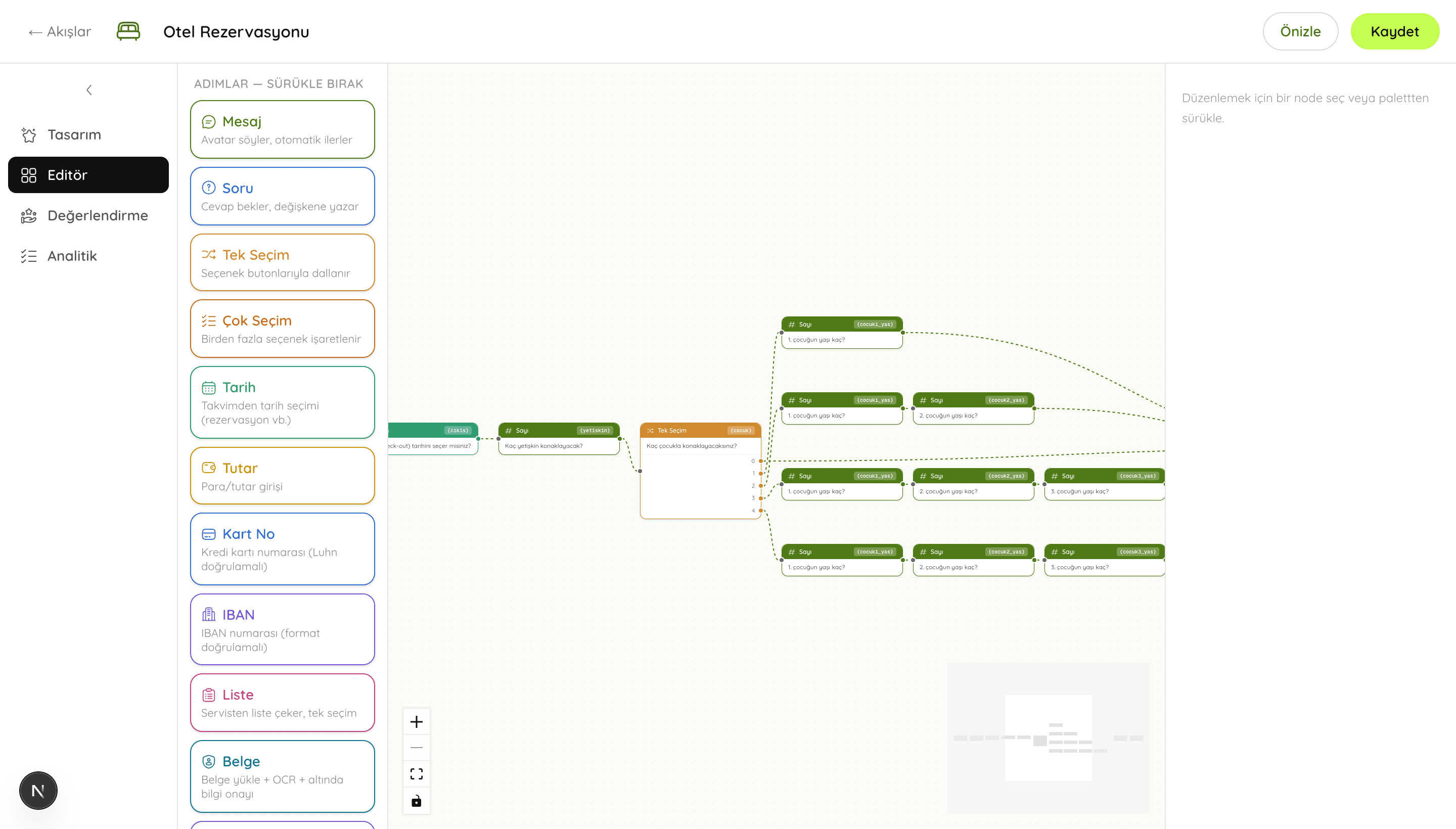
Drag-and-Drop Flow Design
Questions, choices, document upload, forms, summaries and conditional branching all arrive as ready-made steps. You build the whole flow without writing code, from a hotel booking to a loan application.

A Voice Avatar with Expression
The avatar speaks your text while lip-sync and facial expression follow along. Users answer either by voice or by keyboard, and the flow advances the same way in both cases.
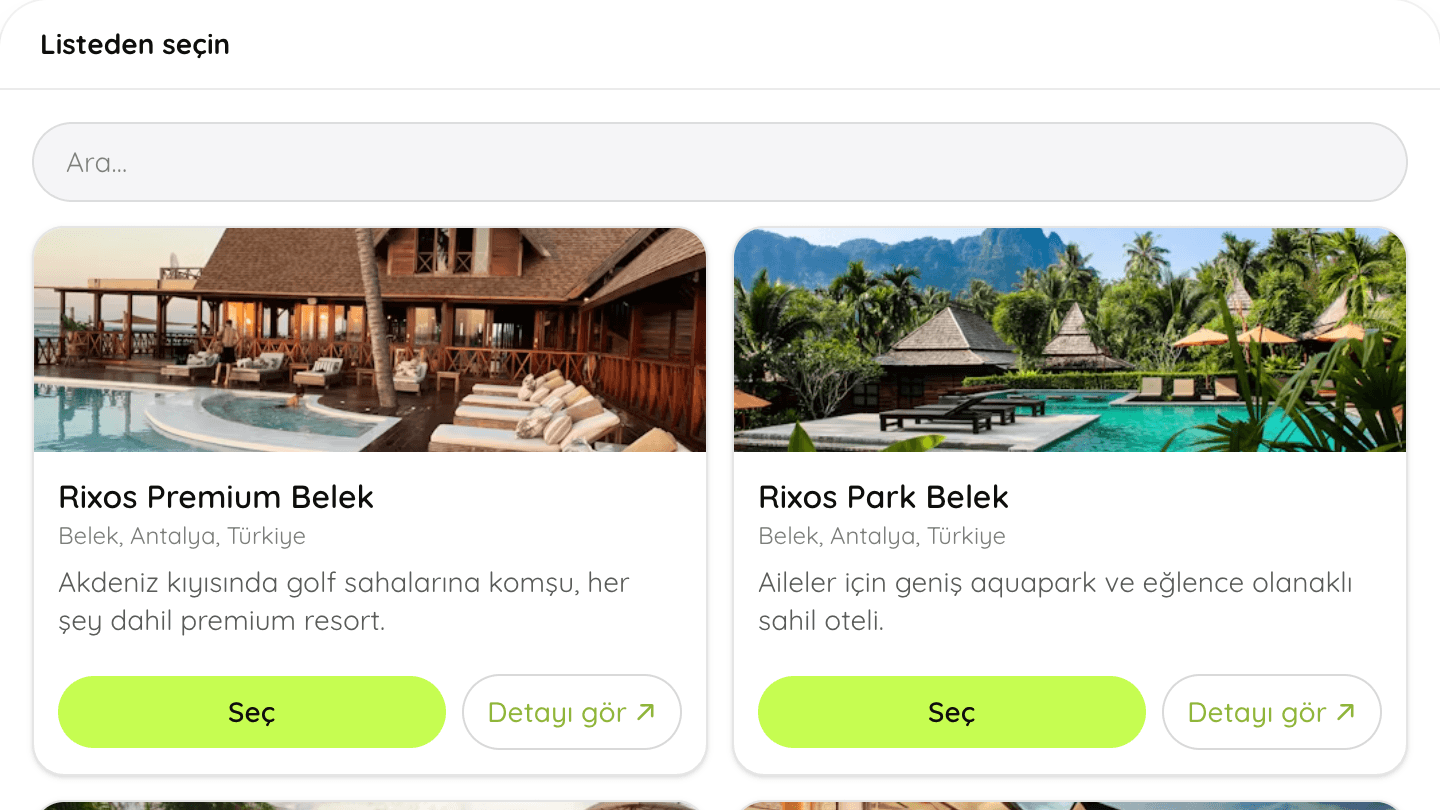
Connects to Your Own Systems
We pull options such as account lists, airports and room types live from your own service over an API connection. When the flow completes, we hand everything it gathered back to you.
When the Conversation Ends, So Does the Job
The avatar supports your customer and does the work itself at the same time. What you are left with is a completed transaction, not a chat transcript.
It Collects While It Talks
Every answer given at every step is written into its field. The customer fills in the form without noticing, in order and without leaving anything blank.
It Talks to Your Systems
Halfway through a flow the avatar can ask your service for availability, pricing or an account list over an API connection. What comes back changes where the conversation goes next.
It Reads Documents and Verifies Them
We compare the fields extracted from a document by OCR with what the customer said. If an identity number, company name, address or registry record does not match, the avatar stops the case and reports it to you.
It Closes the Loop
One tidy, verified record comes out at the end of a flow. If you want, we score that record with AI against criteria you define and rank it in the dashboard.
Live in Three Steps
You build it straight from the browser, without waiting your turn in an engineering queue.
Design
You drag steps onto the canvas and connect them to each other. You decide what each step asks and which field stores the answer.
Publish
The flow goes live the moment you save it. A link of your own is created, and you can embed that link in your site with an iframe or share it as it is.
Talk
Your customer opens the link and works through it with the avatar. The answers given and the completion rates are reported to your dashboard.
What People Build with It
The logic is the same in every sector: ask, understand the answer, complete the task. The only thing that changes is the questions themselves.
Banking and Finance
Loan applications, account opening and card servicing are completed by talking. The customer uploads an identity document, OCR fills the fields, and all that is left for them is to confirm.
Hotels and Travel
The avatar asks for the dates, the number of guests and the room type in turn. Availability and pricing come from your own system over an API connection.
Insurance
Quotes and claims are taken through a conversation instead of a long form. The avatar notices a field that is still missing and keeps asking until it is complete.
E-commerce
Order tracking, return requests and product selection are handled through the avatar. It works at every hour of the day without tying up your support line.
Public Sector
Appointments, applications and information requests are taken by talking. Citizens do not need to know in advance which form they are supposed to fill in.
Education and HR
Candidate screening, enrolment and onboarding steps are run with the avatar. Documents are read, answers are scored with AI, and the result appears in the dashboard.
Try One Now
A few of the flows most often built with ajano.
Hotel Booking
Dates, guest count and room type are chosen by voice. Availability and pricing are queried live over an API.
Flight Booking
Departure, destination, date and cabin class are gathered step by step and the selection is put up for your confirmation.
Banking Transactions
Balance checks, transfers and card debt are handled in the flow. Identity verification happens inside the same conversation.
Business Onboarding
Tax certificates, signature declarations and identity papers are read with OCR. The extracted fields are then cross-checked.
Application Form
Fields are filled automatically from the uploaded documents and the remaining questions are completed by talking.
Support Request
The customer explains the situation. The avatar opens a case, gathers what is needed and passes the request to you.
Why a Conversation Beats a Form
The questions are the same. What changes is who can answer them, how many people finish, and what you are left holding.
Abandoned Applications Stop Being Invisible
A long form never tells you where it lost someone. Here every step is recorded, and you see in your dashboard how many people dropped at which question, laid out as a funnel. You do not have to guess which step to fix.
Using a Keyboard Is Not Compulsory
Answers can be given by voice or by typing. Someone in a hurry on a phone, someone who dislikes typing, and someone who would never open a long form all still complete the flow to the end.
Changes Do Not Wait for a Release
You add a new question or campaign step in the dashboard and save it, and it goes live at that moment. You do not have to schedule a deployment or ship an app update.
Verified Records Reach Your Dashboard
We read the fields of the uploaded document and compare them with what was declared: identity number, company name, address and registry record. Where there is a mismatch, the case is flagged before it moves on.
Yours to Shape, On Every Device, On Your Own Servers
The avatar is open at every hour of the day. You decide where it runs and what it measures.
Fully Customisable
You tune the avatar's appearance, voice and manner, along with every step of the flow. Each workspace can have an avatar of its own.
Works on Every Device
It opens in the browser on phones, tablets and desktops. There is no application to download, and you can embed the flow in your site with an iframe.
Step-Level Analytics
You see how many applications started, how many were completed and who dropped at which question. The number of documents read, the average completion time and the country breakdown sit on the same screen.
Runs on Your Own Hardware
Where data cannot leave the institution, ajano is installed on your servers and the speech recognition and language models run there too. In banking and the public sector this is the question that comes up most.
Frequently Asked Questions
What is ajano?
A web platform that turns a workflow of your own into a spoken conversation with an avatar. You design the flow by dragging steps; your customer opens a link in the browser and completes the task by talking. There is nothing to install and no mobile app.
How is this different from a chatbot?
A chatbot chats, and that is where it stops. ajano speaks, reads documents and runs a process behind the conversation. What it gathers passes through the steps you defined, gets checked against your own systems where needed, and ends as a completed transaction rather than an open-ended chat.
Does the avatar really do work in the background?
Yes. As it talks it writes every answer into a field, queries your service at the points you chose, changes direction based on what comes back, and compares the contents of uploaded documents with what was said. When the conversation ends, what lands in your dashboard is not a transcript but a verified record ready to be processed.
Can I see where applications fall apart?
Yes, the analytics are part of the product. How many people started, how many finished and how many dropped at each step all sit in your dashboard as a funnel. Alongside them you get which documents were read, the average completion time and the country breakdown of applicants. Completed applications can also be scored against criteria you define and ranked.
Can the data stay on our own servers?
Yes. ajano can be installed on your own infrastructure, with the speech and language models running on your hardware, so recordings and documents never leave the institution's network. That flexibility is uncommon, and in banking and the public sector it tends to be the first thing people ask about.
Do I need to write code?
No. Flows are built by dragging steps in the dashboard. Code only enters the picture if you want to connect your own systems, and that amounts to entering an endpoint.
Which documents can it read?
Structured documents such as identity cards, tax certificates and trade registration papers, along with PDF files. Fields extracted from a document appear already filled in for the user to confirm, and details such as identity numbers, company names, addresses and registry records are cross-checked.
Which languages does it support?
The interface is available in Turkish, English and Arabic. Which languages the avatar can speak depends on the speech and language models you connect; Turkish voice input and output work out of the box.
Does it work on every device?
Yes. It opens in the browser on phones, tablets and desktops. Nothing needs to be downloaded or installed, and the link you share behaves the same way everywhere.
Can the avatar match our brand?
Yes. Its appearance, voice and speaking style can all be customised, each workspace can have its own avatar, and a new visual model can be imported.
What does it cost?
We do not publish a fixed price list yet, because pricing depends on volume. Create an account, try the ready-made flows, and get in touch when you want to talk numbers.
Put the Avatar to Work Today
Create an account, start from a ready-made flow, then build your own in the dashboard.
Get Started Free